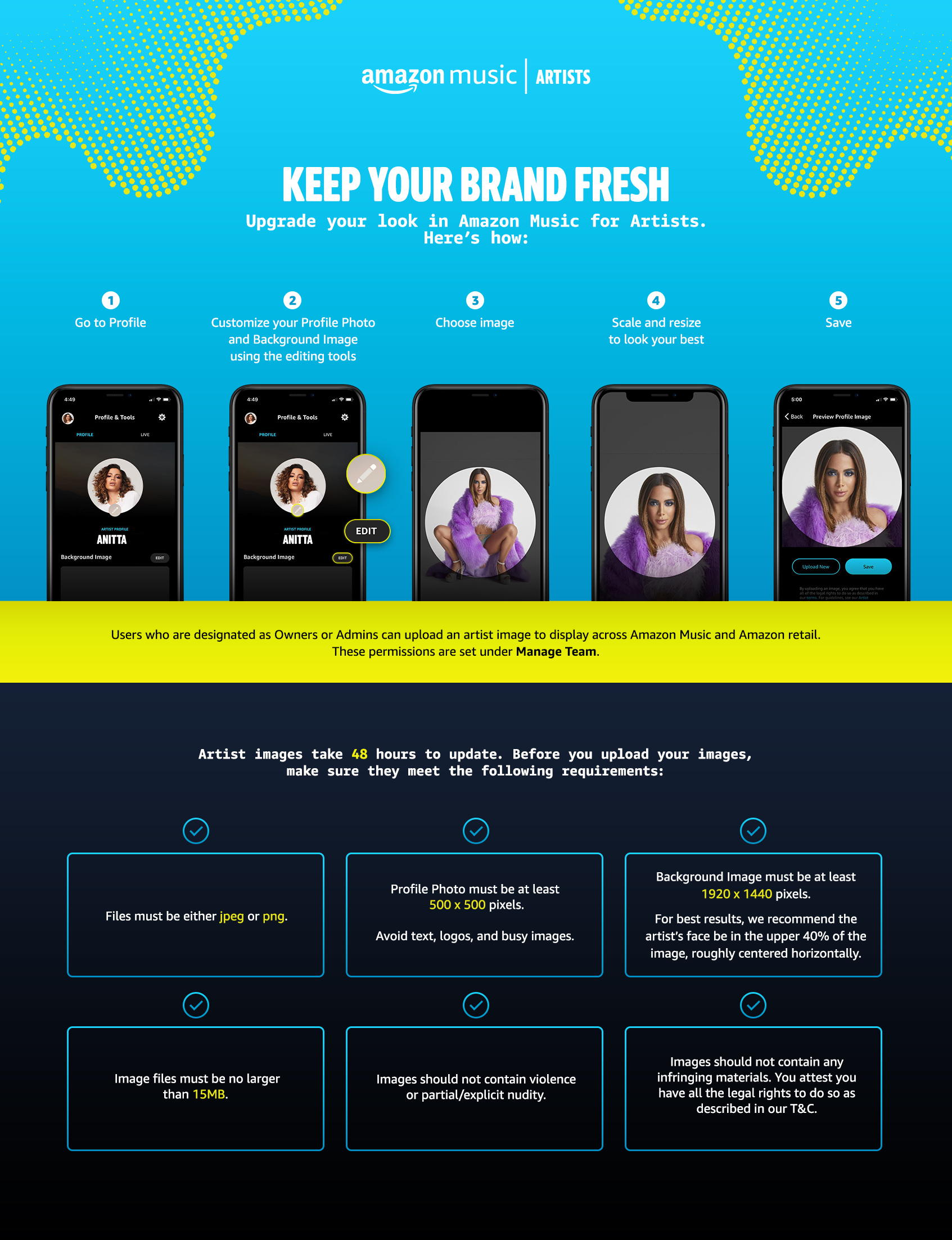
Artist Image Upload in Amazon Music For Artists




Artist now have a faster, simpler solution for controlling the look of an artist profile page across Amazon Music and the Amazon retail website. Owners and Admins within AM4A have the ability to update artist images (both a Profile Photo and Background Image) across Amazon Music and the Amazon retail web – with changes updating within 48 hours.
Visit artists.amazon.com
FAQs
How do I update my artist profile image?
Head to the Amazon Music for Artists app, and follow the instructions below:
Accessing AM4A on iOS/Android:
- Select the artist you want to manage
- Tap the Profile icon in the bottom right hand corner
- Under Profile & Tools, customize both your Profile Photo and Background Image using their respective edit buttons
- Choose image
- Resize your image to look your best.
- Tap Save
Accessing AM4A on web https://artists.amazon.com/
- Select the artist you want to manage
- Click Profile & Tools under Artist Tools in the left side bar
- Under Profile Details, customize both your Profile Photo and Background Image using the editing tools
- Choose Image
- Resize your image to look your best.
- Click Save
What are Amazon Music’s artist image guidelines?
To look your best on Amazon Music, be certain your images meet the following requirements:
- Files must be either jpeg or png
- Profile Photo must be at least 500x 500 pixels.
- Background Image must be at least 1920 x 1440 pixels. For best results, we recommend the artist’s face be in the upper 40% of the image, roughly centered horizontally. See visual guide below.
- Image file must be no larger than 15MB.
- Avoid text, logos and busy images.
- Image should not contain violence or partial/explicit nudity.
- Images should not contain any infringing materials. You attest you have all the legal rights to do so as described in our T&C.
Who has permissions to upload artist images within Amazon Music for Artists?
Owners or Admins within Amazon Music for Artists can upload an artist image to display on Amazon Music and the Amazon retail website. These permissions are set under Manage Team in Amazon Music for Artists
After I update a photo, how long does it take for those images to appear across Amazon?
New images take about 48 hours to appear across Amazon Music and the Amazon retail website.